.png)
Creating focused conversation zones inside a shared spatial environment while making audio transitions, access, and ownership clear.
2021 – 2023
Product Designer
I worked within a five-person design team and collaborated with a Product Manager, engineers, and QA to design and deliver Private Areas.
Teams needed focused conversations without leaving the shared spatial environment. Audio transitions, access rules, and ownership had to remain clear and predictable.
I led the interaction design for Private Areas, from user interviews and prototypes to testing, component design, and implementation support.
I designed lightweight private zones with visible boundaries, predictable audio behaviour, and role-based management controls.
Private Areas strengthened focused team collaboration while preserving the feeling of one shared environment.
I followed an iterative process in which research, prototyping, and design reviews continuously shaped the final solution.
Reviews and playtests helped refine boundaries, audio feedback, access states, and permissions before implementation.
SpatialChat was built around open movement and spontaneous interaction. As spaces became busier, teams needed temporary zones for confidential discussions, workshops, and smaller group conversations.
Moving users into a separate room would interrupt the shared experience. The feature therefore needed to create focus while preserving spatial context and natural movement.
The challenge was not simply to create another room. It was to make privacy feel natural inside an open space.
user interviews
competitor products reviewed
prototype rounds
in-room playtests
User interviews revealed two primary roles with different responsibilities but a shared need for clear and predictable system behaviour.
.png)
Users needed to immediately understand where a private conversation started and ended.
Audio transitions near area boundaries could create confusion and overlapping conversations.
Participants needed to know whether an area was open, restricted, or unavailable.
Teams could not depend entirely on the original creator to edit or remove a shared area.
I mapped the end-to-end experience to identify where users needed clearer system feedback and controls.

The journey highlighted three priority areas: creation, audio behaviour, and shared management.
The final solution treated Private Areas as lightweight zones inside the shared environment rather than separate rooms. Users could create, enter, and manage focused conversations without leaving the main space.
Users could place an area directly inside the space, define its size, name it, and configure access within one focused flow.
Creating the area in context made its position immediately clear.
Size, name, and access were combined into one short interaction.
Users could review the final boundary before confirming the area.
Visual boundaries, labels, and transition feedback helped users understand when they moved between shared and private conversations.
The area remained recognisable without dominating the shared space.
Users received immediate feedback when their audio context changed.
Open, restricted, and locked areas had clearly differentiated states.
A collaborative area could not depend entirely on its original creator. I designed role-based controls that allowed authorised team members to edit access settings or remove an area.
Creators and authorised administrators could manage the area.
Available actions changed according to the user’s role.
Deletion required confirmation and explained its impact.
Private Areas added focus without changing the fundamental behaviour of the shared spatial environment.
I created reusable patterns for spatial boundaries, area labels, access states, permission controls, warnings, and confirmation dialogs.
These patterns helped Private Areas remain consistent with the wider SpatialChat experience and supported future collaboration features.
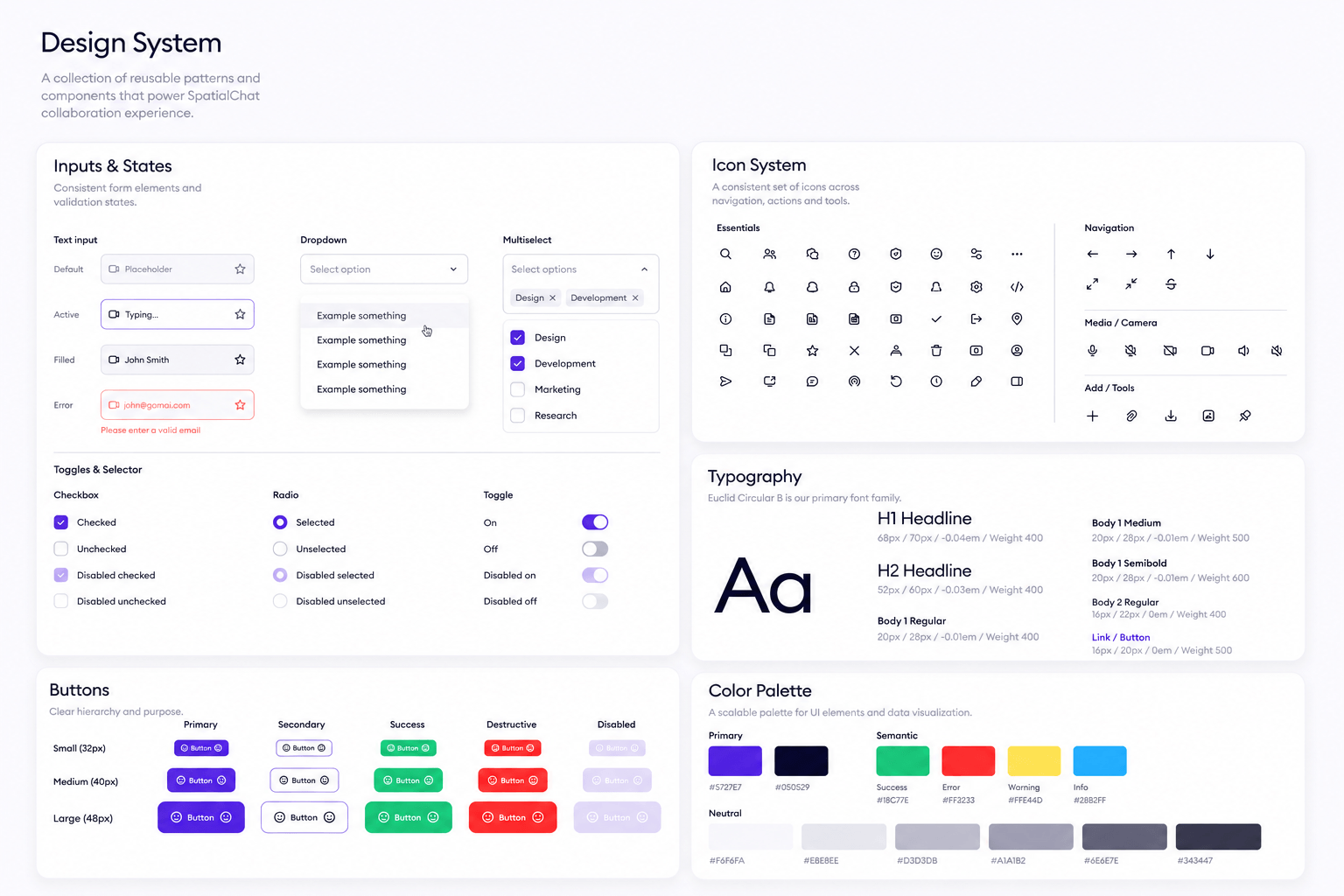
The system focused on reusable interaction states rather than isolated visual components.
I reviewed prototypes to evaluate whether users understood area boundaries, audio transitions, access rules, and management controls.
Users could enter an area without immediately noticing the audio-state change.
Strengthened the visual boundary and transition feedback.
Restricted and open areas were not sufficiently different.
Added clearer labels, lock states, and access feedback.
Administrators expected to manage areas created by other team members.
Added role-based editing and deletion permissions.
The system focused on reusable interaction states rather than isolated visual components.
I reviewed prototypes to evaluate whether users understood area boundaries, audio transitions, access rules, and management controls.
The system focused on reusable interaction states rather than isolated visual components.
Eligible Team workspaces that created a Private Area.
Users who successfully created, entered, and managed an area during testing.
Team plan conversion
Alongside Private Areas, I designed additional workflows across the dashboard and virtual space.
I redesigned the invitation flow to give hosts a clearer and more flexible way to bring participants into SpatialChat.
I redesigned the invitation flow to help hosts bring participants into SpatialChat through shareable links and personalised email invitations.
Hosts could select the most appropriate invitation method for each meeting.
Sent, pending, and accepted states made invitation progress easier to track.
Hosts could copy, resend, and manage invitations from one consistent flow.
I designed a scheduling flow that connected room selection with Google Calendar.
The selected SpatialChat room remained visible throughout the flow.
Hosts could create a scheduled event without leaving SpatialChat.
I also contributed to a unified add-content menu for files, notes, media, and external collaboration tools.
The most difficult part of Private Areas was not drawing the zone itself. It was making invisible behaviour—audio context, privacy, access, and ownership—clear and predictable.
The project reinforced that real-time collaboration products require strong system feedback, especially when users move between several communication states inside one shared environment.
Good spatial interaction design makes invisible system behaviour feel visible and trustworthy.